
in this article
- Types of videos for a product launch
- Examples of product and app launch videos
- Script for the main launch video
- Video launch plan: before, during, and after
- Formats for product launch videos
- Channels: which version goes where
- How to measure launch videos
- Common mistakes in product launch videos
- How much does a product launch video cost?
- Frequently Asked Questions
- A well-planned launch yields videos for months.
A product launch video shows what the product does, who it's for, and how to start using it, in one or two minutes. In a well-planned launch, it comes with teasers, tutorials, announcements, and a version for the sales team.
In this guide, you'll see the types of videos that go into a product or app launch, real-world examples, a script structure, and a dissemination plan with a timeline: before, on the day of, and after the launch. We also show formats, channels, how to measure, common mistakes, and costs.
Quick summary:
- The main video answers three questions: what problem does the product solve, how does it work, and what does the person do next.
- Teaser clips, tutorials, early user testimonials, and ad cuts all follow the same basic script when planned together.
- For software and applications, Motion graphics with real product screenshots. It is the most commonly used format.
- Produce the sales and support version before launch day.
- Measure each video by the role it plays in the sales funnel.
Types of videos for a product launch
A video release functions as a whole. Each piece has an audience and a time, and none of them needs to replace the others.
| Type | Goal | Typical duration | When it enters |
|---|---|---|---|
| Teaser | create anticipation, announce the date. | 15 to 45 seconds | before launch |
| Main video | present the product and its benefits | 1 to 2 min | on the day |
| Explanatory | To show how it works, step by step. | 1 to 3 min | on the day and afterwards |
| Tutorial | to teach a specific task. | 1 to 4 minutes each | then, in adoption |
| Testimonials from early adopters | prove that it works | 30 sa 2 min | weeks later |
| Advertisements | reach and registration | 6 to 30 seconds | on the day and afterwards |
| Internal version for sales | Prepare both the salesperson and the customer service representative. | 3 to 10 min | before launch |
Teaser
The teaser reveals little: a detail of the product, the promise, and the date. It's suitable for waiting lists, launch events, and social media. Since there's no product to show in use yet, it works well with animated typography and short scenes.
Main video
This is the piece of content that goes on the website, the product page, and the app store. It explains the problem, presents the solution, and shows the product in action. It ends with a single call to action: download, register, request a demo.
Explanatory and tutorials
The explanation shows the complete usage flow. The tutorials break down this flow into tasks, one per video, and link to the help center, application onboarding, and support responses. See how to structure this library in tutorial videos and FAQs.
Testimonials from early adopters
After a few weeks of use, the first customers have something to say. This testimonial is the missing piece of evidence from launch day and helps with the second wave of promotion. The formats are in customer testimonial video.
Advertisements
Cuts of 6, 15, and 30 seconds, vertical and horizontal, with the strongest information in the first few seconds. It's worth producing different openings to test which one attracts the most attention.
Internal version for sales and customer service.
Those who sell and those who provide customer service need to know the product before the customer does. The internal version can be longer and more technical, with frequently asked questions, objections, and comparisons to the previous product. In B2B technology products, it also serves as a basis for... sales demo.
Examples of product and app launch videos
1. Bernoulli School: Launch of the Go Home app
Motion graphics · 1:39 · view case study
Go Home organizes the pick-up of students by their parents at the end of the school day. The guide provides step-by-step instructions on how to use the app, and the original illustrations depict arrival and departure from school, reflecting the school's and the app's branding.
What to take advantage of: The script was delivered with a mood board and detailed descriptions of the animations, a method that eliminates the need for a storyboard and is helpful for projects with tight deadlines.
2. Nok Nox by QuintoAndar: main video and advertising versions
Motion graphics · 1:40 · view case study
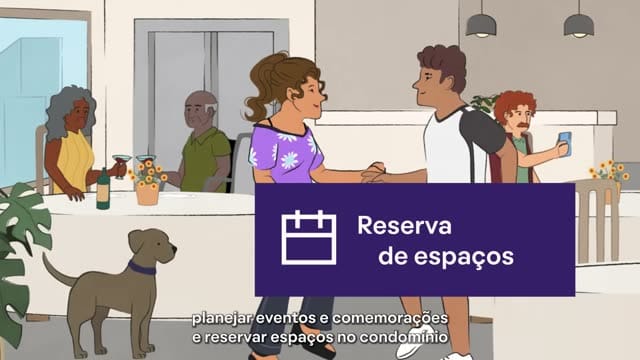
The condominium app received a presentation video with exclusive illustrations, following QuintoAndar's brand book. In addition to the main video, the delivery included shorter versions for advertisements, in both horizontal and vertical formats.
What to take advantage of: Planning ad cuts along with the main video avoids having to make hasty adjustments later.
3. ToLife: the software in action
Software presentation · 2:03 · view case study
To introduce the telemedicine software to the market, the video combined screen recordings, stock images, motion graphics, and graphic interventions. The final product had a subtitled version and a vertical version for Reels.
What to take advantage of: The actual product screen lends credibility, and the animation on top directs the eye to the feature that matters.
4. Vaccinar: internal application presented by characters
Animation with lip sync · 2:22 · view case study
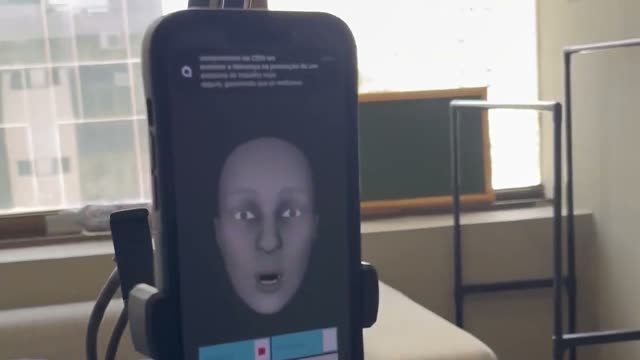
Vaccinar has launched a new platform and an in-house app. Instead of a screen demonstration, the characters created for the brand speak to the team, their lips synchronized to the narration.
What to take advantage of: Internal launches are still launches. Characters help when the audience consists of employees who need to adopt the tool. More examples at [link to more examples]. Characters in animated videos.
5. Santa Amália: a series of tutorials for an internal app
Lively training session · 2:28 · view case study
To introduce the Agile Promoter app to the trade marketing team, 5 motion graphics videos were produced, featuring a guide character, lip sync, and screen recordings of each function.
What to take advantage of: Dividing the app into short videos, one per function, makes it easier to consult later and update only the video that has changed.
6. Objective: Technical portfolio explained for sale.
Motion graphics · 3:06 · view case study
Objective needed to present system modernization services and solutions with AI agents. The script translated technical terms into business language, and motion graphics organized the flow of information for the sales team to use in meetings.
What to take advantage of: In technical product reviews, the customer's pain point opens the video. Technology then comes in as the solution. Watch. How to explain complex B2B products using motion graphics..
7. Fundação Dom Cabral: platform teaser in time for the inaugural class.
Platform teaser · 1:38 · view case study
The Qualifica SP Empreenda teaser shows the platform from the inside, from registration to individual mentoring, with screens recorded with a participant login and applied to computer, tablet, and mobile phone mockups. The project took about three weeks and was ready for the program's launch.
What to take advantage of: With the product already navigable, recording the screen with a test user is the quickest way to demonstrate the step-by-step process.
8. Campus Lab: five openings for the same announcement
Explanatory and promotional material · 0:45 · view case study
To promote the platform to law students, the project included an explanatory animation and a promotional video with five variations of the introduction, each with a different opening phrase.
What to take advantage of: Different opening sequences for the same ad allow you to test the message in paid media without producing new videos.
Script for the main launch video
The order below works for a 60-90 second video. According to 2026 research by Wyzowl, 71% of marketing professionals consider videos of 30 seconds to 2 minutes to be the most effective.
- The problem, in the customer's voice. A situation that is recognizable within the first few seconds.
- The product as a response. Name and what he/she does, in one sentence.
- How it works. Three or four screens or usage moments, in order.
- The gain. What a person saves, avoids, or manages to achieve.
- Next step. Where to download, how to register, who to contact.
| Block | Time in 90 seconds | Question that answers |
|---|---|---|
| Problem | 10 to 15 seconds | Is this about me? |
| Product | 5 to 10 seconds | what is it? |
| How it works | 40 to 50 seconds | Is it easy to use? |
| Gain | 10 to 15 seconds | What do I get in return? |
| Next step | 5 to 10 seconds | What do I do now? |
Avoid listing all the resources. Choose the ones that solve the problem at the beginning of the video and leave the rest for the tutorials. To adjust the text to the timing, use the guide. script time.
Video launch plan: before, during, and after
The timeline starts from the release date. The benchmark timeframe for short animations is 3 to 5 weeks, and a package with multiple videos requires more time, with staggered deliveries.
| Moment | Videos | Channels |
|---|---|---|
| 8 to 6 weeks before | Briefing, basic script for all pieces, access to the product in testing. | internal |
| 4 to 2 weeks before | Teaser ready; version for sales and support. | waiting list, networks, internal training |
| 1 week before | Main and explanatory videos approved; ad cuts ready. | scheduling posts and campaigns |
| Launch day | main video, ads, email with video | website, app store, LinkedIn, Instagram, YouTube, email |
| 1 to 4 weeks later | tutorials by function, new cuts | help center, onboarding, support |
| 1 to 3 months later | Testimonials from early users | product page, sales, second-wave ads |
The critical point is access to the product. Screen recordings of a version that will still change create rework, so agree with the product team on which version is frozen for the shoot.
Formats for product launch videos
| Format | Best for | Watch out |
|---|---|---|
| Motion graphics with illustration | apps, services, processes | needs a defined visual identity |
| Screen recording with animation | software, platforms, SaaS | frozen interface and test data |
| Characters with lip sync | internal launch, broad audience | longer creation timeline |
| Filming with people | physical product, field use, testimonials | finished product available to film |
| 3D | equipment and products that do not physically exist yet | modeling from the technical design |
| Animated typography | teaser, short ads | very lean text |
To compare styles, see types of animation for corporate video and the page of Video for technology companies.
Channels: which version goes where
| Channel | Version | Detail |
|---|---|---|
| Product page | main video, 1 to 2 min | near the sign-up or buy button |
| App store | short intro video | follow each store’s duration rules |
| 30- to 60-second cut | subtitles for viewers who watch without sound | |
| Instagram and TikTok | vertical, 15 to 45 s | product on screen in the first seconds |
| YouTube | main video and tutorials | playlists by function help search |
| thumbnail linking to the video | for the current customer base | |
| Paid media | 6-, 15- and 30-second cuts | opening variations to test |
| Sales | full version and demo | in proposals and meetings |
In the State of Video 2026 survey from Wistia, 81% of teams said they publish video on LinkedIn and 76% on YouTube. To organize media, see how to integrate paid traffic with your videos.
How to measure launch videos
Each piece has a different job, so the metric changes too. Comparing the teaser and the tutorial by the same number tells you nothing.
| Video | What to measure |
|---|---|
| Teaser | waitlist sign-ups, reach |
| Main video | retention through the final call to action, clicks and sign-ups on the page |
| Advertisements | cost per sign-up or download, comparing the openings |
| Tutorials | a drop in support tickets on that topic |
| Testimonials | use in proposals, conversion rate of pages with and without the video |
| Internal version | how many salespeople and support agents watched before the launch |
Retention matters a lot for short video: in the 2025 benchmark from Vidyard, 65% of people watch videos under 1 minute all the way to the end. More metrics in B2B video distribution and measurement.
Common mistakes in product launch videos
Showing every feature. The main video turns into a manual and nobody reaches the end. The secondary features go to the tutorials.
Recording screens of an unstable version. If the button moves a week later, the video is wrong on launch day.
Leaving out sales and support. The customer watches the video, calls with a question, and the support agent hasn’t seen the product yet.
One single video for every channel. The same 2-minute horizontal file on Reels and in the ad loses attention right at the start.
Talking about the company before the problem. The first seconds belong to the customer and the situation they’re living in.
Forgetting what comes after. Without tutorials and testimonials, promotion stops on launch day, just when the first users start having questions.
How much does a product launch video cost?
The figures below are 2026 market references, including taxes. What weighs most on the budget is the number of pieces, the level of animation and the need to film with people.
| Format | Reference range | Larger projects |
|---|---|---|
| Animation or motion graphics (1 video up to 2 minutes) | R$ 6 thousand to R$ 15 thousand | Longer videos, original illustrations, characters, or 3D: above R$ 20,000 |
| Animated package (main, explainer and tutorials, 2 to 6 videos of 1 to 3 min) | R$ 10 thousand to R$ 35 thousand | 10 or more videos, or more than 30 minutes of animation in total: above R$ 60 thousand |
| TV spot or campaign (1 film of 30 s to 2 min) | R$ 6 thousand to R$ 25 thousand | A campaign featuring multiple films, cast, and locations: above R$ 50,000 |
| Video package for social media (10 to 30 videos of 15 to 1 minute each, with 1 to 2 days of footage or cuts of previously recorded material) | R$ 15 thousand to R$ 40 thousand | Continuous monthly production or multiple formats: above R$ 50 thousand |
| First-user testimonial video (1 video of 2 to 4 min, 1 customer, half to one shoot day) | R$ 8 thousand to R$ 18 thousand | Another city, more locations or operational images: above R$ 25 thousand |
Voice-over costs R$400 to R$1,300 per video of up to 3 min and can be simulated in voice-over calculator. The other ranges are in How much will a video cost in 2026?.
Frequently Asked Questions
What is the ideal length for a launch video?
60 to 90 seconds for the main video, up to 2 minutes if the product is more complex. Teasers and ads run 6 to 45 seconds, and tutorials can be longer because viewers already want to learn.
Is it possible to produce the video before the product is ready?
Yes, with animation or 3D built from the design and prototypes. Be careful to freeze the interface shown in the video or illustrate it in a simplified way, so you don’t show something that is about to change.
Animation or recording with people?
For software and apps, animation with real screens covers most launches. Filming with people makes sense when the product is physical, when it is used in the field or when you want testimonials.
How many videos should you produce for a launch?
The minimum useful package is the main video with cuts for social media and ads. With more budget, a teaser, a sales version and tutorials come in. Testimonials can wait for a second phase, when there are users with results to share.
Is the launch video suitable for internal releases?
It works, with adjustments. For employees, the focus shifts to how to use the tool in each person’s job, as in the cases of Vaccinar and Santa Amália. A series of short tutorials works better than one long video.
A well-planned launch yields videos for months.
The main video is just the most visible piece of the launch. With a teaser, a sales version, ad cuts, tutorials and testimonials planned together, the product keeps being presented long after announcement day.
If you have a product or app to launch, send the date and what it does and we’ll put together the video plan with you.
Published on October 9, 2026

Samuel Silva is the co-founder and Creative Director of Silvertake Vídeo, a video production company in Belo Horizonte. He leads a team that combines creativity and technology, delivering over 7,000 videos for more than 100 companies. A graduate in Advertising from PUC Minas, Samuel specializes in marketing, creative automation, and audiovisual production.