in this article
- Why accessibility starts before recording.
- Subtitles: How to create closed captions that work
- Audio description in video lessons: where it fits in and how to write a script.
- Sign Language Window: How to record and position
- Delivery checklist for your LMS
- How Silvertake does it
- Start with the next lesson, not the entire catalog.
Turning on automatic subtitles in the player does not guarantee accessibility in distance education. It's a start, and almost always a start full of mistakes.
Accessibility in a video lesson has three aspects: revised subtitles, audio description, and sign language. All three work much better when they are included in the script rather than being added as a last-minute request in post-production.
Why accessibility starts before recording.
If accessibility is only added after the final cut, problems quickly arise. The sign language window covers the graphic explaining the concept. The audio description can't pause to play, and the subtitles clash with the professor's name on the screen.
Solving this in the editing process requires rework. Sometimes it costs an additional day of filming. Planning it in the briefing requires a conversation.
There is a legal obligation that weighs on companies and educational institutions, and then there is the practical side. Training that part of the team is unable to keep up with. does not fulfill the objective for which he was paid.
Three decisions to make in pre-production.
- A phrase that describes the visual: The script verbalizes what appears on the screen instead of pointing to it.
- Framing with open area: The camera reserves a corner of the frame for the sign language window.
- Graphics package with safe zone: Lower thirds and text are outside the caption area.
Subtitles: How to create closed captions that work
Transcribe with AI, review with people.
Transcription tools deliver the first version in minutes. The problem is what they get wrong: professor's name, company acronym, technical course terminology.
Create a glossary with the terms from each module and submit it to the reviewer. A caption with an error in a key concept teaches incorrectly, and that's worse than having no caption at all.
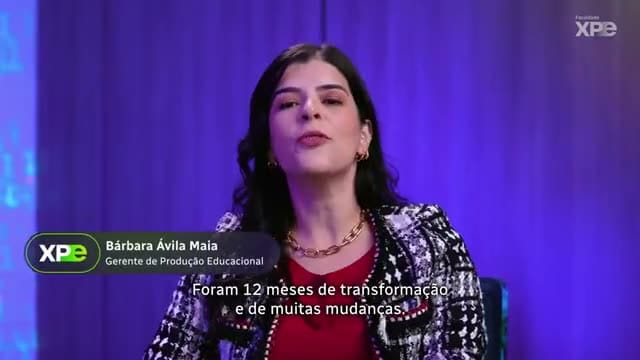
Subtitles for the deaf indicate who is speaking and which sounds are important.
The captioning, designed for deaf or hard-of-hearing people, identifies who is speaking when the person is off-screen. It also indicates sounds that carry meaning, such as [security alarm] or [classroom laughter].
Constant background music doesn't need to be noted. Sound that changes the understanding of the scene does.
Formatting rules that prevent abandonment
- A maximum of two lines per block, broken up where the sentence makes sense.
- Comfortable reading time, without flashing blocks.
- Synchronization with speech: the subtitles don't reveal what the professor hasn't yet said.
- Semi-transparent background, to maintain contrast over any image.
- Low and centered position, moving up when there is text in the footer.
SRT or VTT, always in a separate file.
Closed captioning in a separate file allows you to turn captions on and off, correct errors without exporting the video again, and translate into other languages. Subtitles burned into the image are for social media edits. Before you begin, confirm which format your LMS supports.
Audio description in video lessons: where it fits in and how to write a script.
Audio description narrates information that only exists in the image: the graph, the text on the slide, the teacher's gesture, the demonstration on the equipment. Without it, the lesson has gaps for those who are visually impaired.
First, reduce the need for audio description.
Compare two statements. “As you can see here, the curve falls” excludes everyone. “The sales curve falls in the second quarter and rises again at the end of the year” includes everyone.
If the script already describes the visuals, the subsequent audio description is short and easy to incorporate, which also reduces the cost of the work.
Map out the sections that lose meaning without images.
Listen to the final cut with the screen off. Mark with timecode each point where the information disappears.
This map becomes the basis for the audio description script, written by an audio describer and, preferably, validated by a visually impaired consultant. To determine if the text fits within the pause, the calculation is the same as that used for... Calculate how many words fit into a minute of speech..
Standard or extended
Standard audio description fills in the silences of speech. In dense, uninterrupted lectures, use the extended version: the video freezes while the narration describes and then resumes.
In distance learning this works well because the student already controls their own pace. In the mix, the voice description takes priority and the background music is lowered in those sections.
Sign Language Window: How to record and position
Brazilian Sign Language (Libras) is the translation from one language to another.
Brazilian Sign Language (Libras) is a language with its own grammar, not signed Portuguese. Therefore, the translator-interpreter needs to receive a script and instruction in advance.
Technical terms without a standardized symbol require a decision: combine a symbol or use fingerspelling. Record the choice in a glossary to maintain consistency across modules.
How to capture the interpreter
- Plain, contrasting background, or chroma key for clean cutouts.
- Plain, dark clothing, without prints or shiny accessories.
- Framing from the waist up, with space to the side for the hands.
- Soft, frontal lighting, without shadows on the face, because facial expression is part of grammar.
- Monitor with the lesson running, to synchronize with the teacher.
Composition in editing
The window is located in a lower corner, sized to allow hands and faces to be legible on a laptop screen. No graphics overlap it.
Export the version with sign language separately from the clean version. This way, each student chooses the one they need, and no one is forced to view the window.
Delivery checklist for your LMS
- Master class without subtitles and without a window.
- Revised SRT or VTT files, one per language.
- Version with audio description, or alternative audio track if the player supports it.
- Version with sign language interpretation window.
- Text transcription, which also serves for searching and reviewing.
- Glossary of terms and symbols used in the course.
Before publishing, test if the player accepts multiple subtitle and audio tracks and if it works with the keyboard. If not, organize the versions as separate links within the module.
How Silvertake does it
Here, accessibility is included in the briefing, along with the target audience, platform, and deadline. We ask right at the beginning what versions the project will have, because this changes the script, framing, and graphic package.
Node Tecnosulfur Code of Ethics, From the Opta Group, the motion graphics video was released in Portuguese, Libras (Brazilian Sign Language), English, Spanish, and French, with native voice actors and cultural adaptation for each subsidiary. Defining the versions at the beginning allows the animation to reserve the right space for each one.
In high-volume projects, such as Cásper Líbero distance learning video lessons, The logic is that of a conveyor belt: capture, edit, and deliver at scale. In this approach, revised captions and accessible versions become a fixed step, instead of a parallel project that delays everything. We explain this organization in the guide about... How to record video lessons at scale..
If your case involves a course for students or an internal learning path, see how we work with it. Video for courses and distance learning. and with corporate training video.
Start with the next lesson, not the entire catalog.
You don't need to adapt the entire collection at once. Prioritize the mandatory learning paths and new courses, and include accessibility as a permanent feature. Training and e-learning planning for 2027.
If you'd like to understand how this affects your schedule and budget, talk to our team. Send your briefing via the contact form. And we'll design the versions together with you.
The goal is simple: no one on your team should have to drop out of the course halfway through.
Published on November 17, 2026

Samuel Silva is the co-founder and Creative Director of Silvertake Vídeo, a video production company in Belo Horizonte. He leads a team that combines creativity and technology, delivering over 7,000 videos for more than 100 companies. A graduate in Advertising from PUC Minas, Samuel specializes in marketing, creative automation, and audiovisual production.