
in this article
Silvertake reviewed client-side video on Frame.io from 2020 until January 2026. Today it uses another tool, and it's fair to say right away which one: RecReview, which we ourselves created.
Therefore, this text has two parts. One explains why we left and what took its place. The other compares the... alternatives to Frame.io which ones are worth looking at, including those that compete with ours, what each one does well and how much it costs.
Why look for alternatives to Frame.io?
Frame.io remains a great review player. Its integration with Premiere and After Effects is the deepest on the market, and for a team that spends all day inside Adobe, it makes perfect sense.
The problem arises when review is only part of the work. Here, the video was stored on Frame.io, the tasks and hours were tracked on RunRun, and some of the deliverables were sent via WeTransfer without any review.
There were three systems for the same video. Anyone who wanted to know the status of a delivery had to open all three.
Price per member
Frame.io is free for 2 members and costs US$$ 15 per member per month thereafter, with the Pro plan limited to 5 members. In a production company with editors, freelancers, and producers coming and going from projects, the bill follows each new person.
What the player doesn't check
Reviewing involves watching the cut, commenting, and approving. No step verifies the file before it reaches the client: the distorted audio, the black frame in the middle of the scene, the misspelled name in the graphics. This still depends on someone watching very carefully.
Alternatives to Frame.io, compared
The prices below were removed from each vendor's page on October 20, 2026, for the annual plan when displayed by the vendor. The RecReview price is the monthly rate charged in Brazil. Vendors change prices frequently, so check before subscribing.
| Tool | Best for | Starting price |
|---|---|---|
| RecReview | Production companies and agencies with many projects at the same time. | R$ 249 per month, unlimited users |
| Whipster | Simple revision on a small budget. | US$ costs 9.95 per month; Team costs US$ 19.95 per user. |
| Filestage | Approve video along with PDF and image. | Free plan; US$ 199 per month with 10 seats |
| Vimeo Review | Who already pays for Vimeo? | US$ 12 per seat per month on Starter |
| Dropbox Replay | Who already saves everything on Dropbox? | Free for up to 4 files; then US$ 10 per user per month. |
| Ziflow | Large brand teams with compliance steps | Free plan; US$ 199 per month with 15 users |
| PageProof | Agencies approving print, website, and video. | US$ 249 per month for the team, unlimited reviewers |
| SyncSketch | Animation and visual effects | Free plan; US$ 9 per user per month on the annual plan. |
| Collaborate | Small post-graduate houses spending little. | US$$ 5 per month for one person; teams starting at US$$ 15 for 5 members. |
| Frame.io (reference) | Team that works on Premiere and After Effects | Free for 2 members; then US$ 15 per member per month. |
RecReview
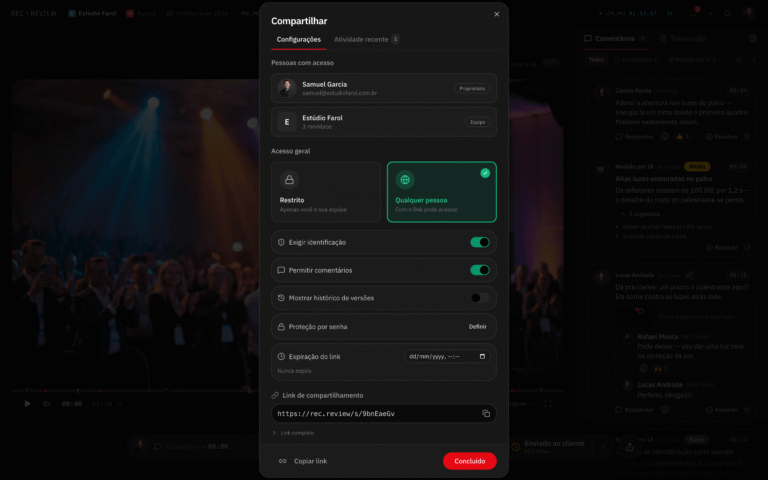
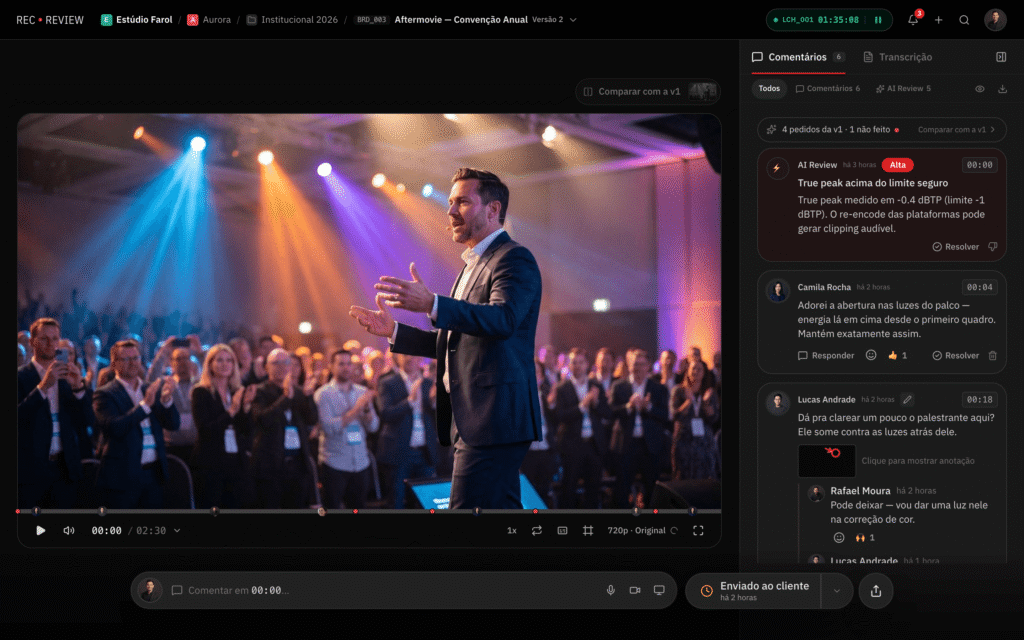
This is what we use at Silvertake. The client opens the link without creating an account, comments on the exact frame, and draws on the image. Each version opens alongside the previous one for comparison.
The difference lies within the player. The video lives within a project framework with a status, deadline, and hours logged.
Each upload can go through an AI check that identifies audio problems, black or frozen frames, typos on the screen, and dialogue that deviates from the script.
Where does he stop?
Every plan has unlimited users, so clients and freelancers don't pay for a seat. But it's designed for video and photo, not PDFs or website pages, and there's no free plan, only a 15-day trial.
Whipster
It's simple, and the client understands it the first time. Comments, drawings, and approvals are done via a link, and those who only review don't pay for a seat.
The entry-level plan is among the cheapest in its category, but Team charges per user. The project management aspect boils down to a to-do list, so it works best for a small marketing team with only a few videos at a time.
Filestage
This is useful when approval isn't solely based on video. The same workflow handles PDFs, images, documents, website pages, and audio, with review rounds and deadlines for each.
For a marketing department that approves the video along with the campaign brochure and post, this is a significant factor. For a production company, it's less of a burden: video version control is basic, and the paid plan starts at US$199 per month.
Ziflow
Designed for large brand departments. Opens over a thousand file types, automatically guides each piece through the approval stages, and keeps an audit trail for compliance.
It's the most comprehensive in approval routing on this list. However, it takes time to set up and has too many features for a small video team.
PageProof
Approval for in-house agencies and studios that review print, website, and video. Includes side-by-side version comparison, checklists for each piece, and unlimited reviewers across all plans. Pricing is per team, not per person, and there is no free plan.
Vimeo Review and Dropbox Replay
If the company already pays for Vimeo or Dropbox, the review comes along with it, with timecode comments on the files that are already there. That's enough for occasional feedback.
For a company that approves dozens of videos per month, there's a lack of organization: there's no project board or file review. Replay still charges per user on top of the Dropbox plan.
SyncSketch and Kollaborate
Two more specific cases. SyncSketch comes from animation and visual effects dailies, with frame-by-frame drawing over video and even over 3D models. It wasn't designed for client approval.
Kollaborate is a veteran post-production review and sharing tool with a low entry price and plans that scale with storage. It handles review and sharing, and that's about it.
Frame.io, for those who stay
Not everyone needs to switch. If your team edits all day in Adobe, reviews internally, and already has another system for deadlines and hours, Frame.io remains a great choice. Camera to Cloud, which uploads takes directly from the set, has no equivalent among the alternatives.
THE comparison of video review software It has its pros and cons, and the... Alternatives to Frame.io on RecReview It goes into detail about each exchange.
How to choose between them
- What do you approve of?. If half of the approvals are based on presentations and printed materials, start with Filestage.
- How many people need to enter?. Count editors, freelancers, and client personnel. In terms of price per user, this number determines the monthly bill.
- Where the rest of the project is located. If deadlines and schedules are already managed within a functioning system, a dedicated review tool will suffice. If they're managed in spreadsheets, it's worth consolidating everything in one place.
- Who approves it from the client's side?. A manager who opens the link on their phone between meetings won't create an account. Test the link with someone outside the organization before deciding.
Questions to ask in the free trial
Almost all of them offer a free plan or trial period. Use a real project, not an example video, and answer:
- Was the customer able to comment on their mobile phone without asking for help?
- Did the editor find all the comments without searching in three different places?
- Is it clear which version was approved and who approved it?
- Is it possible to download the original, uncompressed file after approval?
- How much will it cost with the actual number of people who will enroll in a year from now?
Before migrating, separate the master files and editing projects from what's in the old tool. The precautions are the same as for anyone who... switching production companies without losing the original files.
How Silvertake reviews video today
Since February 2026, every cut from Silvertake goes through RecReview before reaching the client. Script, versions, comments, and hours are all kept in the same project.
What has changed in the numbers?
Comparing March to August 2025 with the same period in 2026, with the same team size, deliveries increased by 20%. The numbers and method are in... Silvertake case on RecReview.
In high-volume projects, such as Over 600 video lessons from the digital postgraduate program at Fundação Dom Cabral, created in partnership with +A Educação., Organized review is what secures the deadline. From the client's side, little changes: a link arrives, you watch it, comment on the exact point, and approve it.
The step-by-step process we followed is in Video approval workflow without rework. and in How to get approved without reaching V15.
Want to see the process up close?
If you're figuring out how to approve video at your company, or you're tired of compiling feedback from five different channels, Send a briefing to Silvertake.. We show how a real project progresses, from the script to the approved version.
Published on October 17, 2026 · updated on October 29, 2026

Samuel Silva is the co-founder and Creative Director of Silvertake Vídeo, a video production company in Belo Horizonte. He leads a team that combines creativity and technology, delivering over 7,000 videos for more than 100 companies. A graduate in Advertising from PUC Minas, Samuel specializes in marketing, creative automation, and audiovisual production.